
I am a big fan of trying out different photo editing apps, applying various filters to my photos and have used a variety of apps such as VSCO, and Lightroom.
A friend of mine recently posted a really cool photo which looked like an image from the 90’s taken with an old school disposable camera. Through her, I discovered the Huji Cam App which is available for iOS and Android devices at the moment and have quickly become obsessed it. I have always loved disposable cameras and was excited to read the description in the app store:
“HUJI Cam makes your moments as precious as the feelings of analog film with old memories. Camera makers of every era always tried to capture the best moments and such an effort continued back in 1998 as well, whereby our memories became clearer. HUJI Cam has the effort of those days to leave precious moments as vivid and vibrant photographs.”
Below are some photos I have taken with the app.


How To Take the Photo
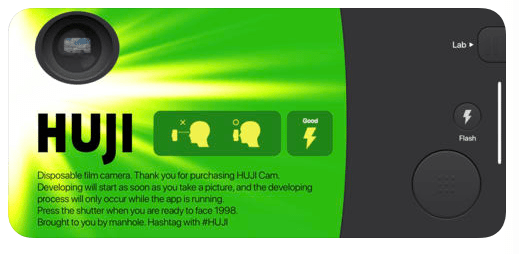
Once you’re inside the app, this is the initial screen that shows up. In the top left corner there is the eyepiece which is sometimes a bit finicky. You have to double tap the “eyepiece” part of it to have a full screen view and then press the large circle button in the bottom right hand corner to take the photo. It works with both back and front camera with a flash option and allows you to select Random Light Effects, and the Photo Quality.
Can you Upload Photos from Your Camera Roll and Apply the Filter and Date Stamp?
Yes, you can. However, even though the app is free and you can take an unlimited amount of photos through the camera itself, it does charge you a small fee to upload photos from your camera roll. In order to have this feature it charges you $1.56 CDN. As long as you are taking the photos directly from the HUJI Cam itself then you do not need to worry about it. It also gives you an option to preserve the photo in it’s original form.
Recommendation
I have really enjoyed using the HUJI Cam so far because it has brought out that retro feeling and spontaneity in my photos. I also love the flare effects when using it with flash and how some of the images appear grainy. My personal favourite feature is the customizable date stamp that you can control under the app’s settings.
Overall, If you want to spice up your photos with that 90’s vibe I would recommend the HUJI Cam since it’s free and generally very easy to use.
I hope you enjoy it as much as I do and if you have any questions please let me know!
 Sara Habibovic
One thought on “HUJI Cam App Review”